
In 2026, the demand for crystal‑clear visuals has never been higher—whether you’re editing 4K video, diving into immersive games, or juggling multiple spreadsheets, a top‑tier 4K monitor can make all the difference.
Yet with dozens of models flooding the market, picking the right one feels overwhelming: varying refresh rates, panel types, color accuracy, and connectivity options make it hard to know which display truly delivers the best value for your specific needs.
This guide cuts through the noise by directly comparing the leading 4K monitors of 2026, highlighting their strengths, trade‑offs, and real‑world performance so you can confidently choose the screen that fits your workflow and budget.
Dell 27 Monitor S2725QS
Solid
As we move further into 2026, 4K monitors have become the new standard for productivity, gaming, and content creation. With sharper text, richer colors, and higher refresh rates now available at increasingly competitive prices, upgrading to a 4K display is more accessible than ever. Whether you're editing videos, designing graphics, or diving into fast-paced gaming, choosing the right 4K monitor can significantly enhance your workflow and visual experience. In this guide, we compare five top-rated 4K monitors currently available on Amazon to help you find the best fit for your needs and budget.
What to Look For
Before making a purchase, consider these key factors when selecting a 4K monitor:
- Resolution & Size: True 4K resolution (3840 x 2160) offers four times the detail of Full HD. Screen sizes typically range from 27 to 32 inches.
- Panel Type: IPS panels provide excellent color accuracy and viewing angles, while VA panels offer better contrast ratios for darker scenes.
- Refresh Rate: A 120Hz refresh rate delivers smoother motion, especially beneficial for gamers and those using macOS or Windows with dynamic desktops.
- Color Accuracy: Look for wide color gamut coverage such as sRGB, DCI-P3, or HDR support if you're doing professional work.
- Connectivity Options: Ensure compatibility with your devices via HDMI, DisplayPort, USB-C, and audio outputs.
- Ergonomics: Adjustable stands with height, tilt, swivel, and pivot functions improve comfort during long sessions.
Product Reviews
Dell 27 Monitor S2725QS

The Dell S2725QS combines affordability with premium features like a 120Hz refresh rate and IPS panel technology. It's an ideal choice for users seeking smooth performance without breaking the bank.
- Key Features: 27-inch 4K UHD IPS, 120Hz, 5ms response time, FreeSync Premium, 99% sRGB, anti-glare coating, multiple ports including USB-C
- Pros: High refresh rate at low price point, good color reproduction, solid build quality, adjustable stand
- Cons: Average brightness levels, no built-in speakers
Bottom Line: The Dell S2725QS is a strong contender for budget-conscious buyers who want high performance and reliable ergonomics in a compact form factor.
Dell 27 Monitor S2725QC

Slightly pricier than its sibling model, the S2725QC adds USB-C connectivity and enhanced eye comfort features, making it great for professionals working remotely or in hybrid setups.
- Key Features: 27-inch 4K UHD IPS, 120Hz, 4ms response time, 99% sRGB, USB-C with power delivery, HDMI, DisplayPort, Eye Comfort technology
- Pros: Excellent port selection including USB-C, crisp image quality, comfortable viewing modes, sleek design
- Cons: Higher cost compared to similar models, limited contrast ratio
Bottom Line: If you need versatile connectivity and prioritize eye health, the Dell S2725QC delivers value despite being slightly overpriced relative to alternatives.
LG 27UP650K-W 27-inch Ultrafine 4K UHD

This LG offering focuses on precision and clarity, targeting creatives and office workers alike. While it runs at only 60Hz, its DisplayHDR 400 certification ensures vibrant visuals across various lighting conditions.
- Key Features: 27-inch 4K UHD IPS, 60Hz, 5ms response time, DisplayHDR 400, 95% DCI-P3, adjustable stand with tilt/height/pivot options
- Pros: Strong HDR support, accurate colors out of the box, highly adjustable stand, affordable entry-level option
- Cons: Lower refresh rate may feel sluggish for gaming or scrolling, lacks USB-C
Bottom Line: For users focused on photo/video editing or general use where frame rate isn't critical, the LG 27UP650K-W provides impressive value with pro-grade features.
Dell 32 Monitor S3225QS

With a larger screen size and VA panel, the Dell S3225QS emphasizes immersion and deep blacks—perfect for media consumption and casual gaming. Its 120Hz refresh rate keeps things fluid even on a bigger canvas.
- Key Features: 32-inch 4K UHD VA, 120Hz, 4ms response time, FreeSync Premium, 3000:1 contrast ratio, 99% sRGB, anti-glare coating
- Pros: Large screen real estate, impressive contrast thanks to VA panel, high refresh rate, good for multitasking
- Cons: Narrower viewing angles than IPS, average brightness output
Bottom Line: Ideal for users wanting a spacious display with cinematic qualities, the Dell S3225QS strikes a balance between performance and presence.
LG 32UR500K-B Ultrafine 32-inch 4K UHD
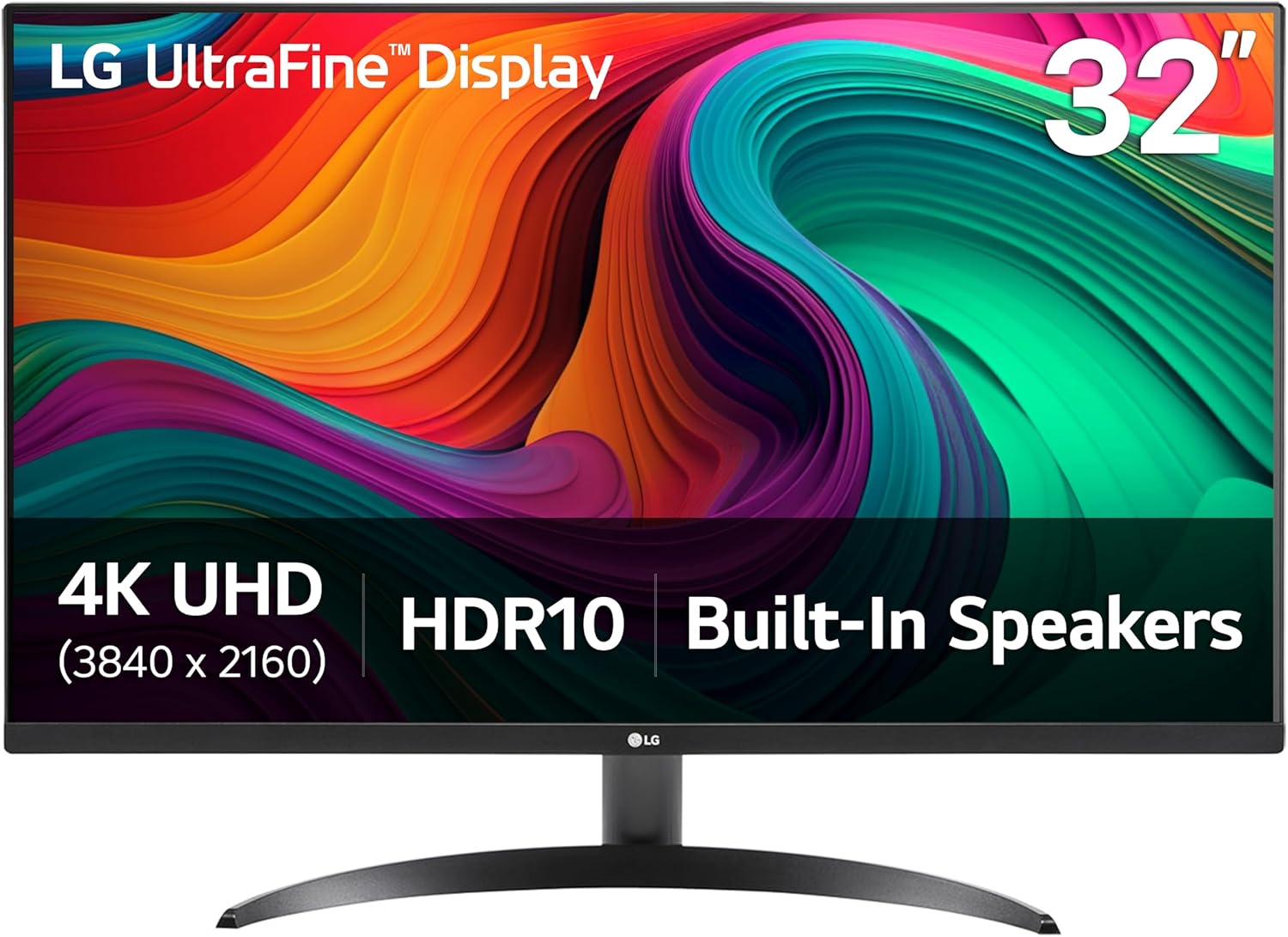
Boasting a borderless design and integrated speakers, the LG 32UR500K-B aims to simplify setup while delivering cinematic visuals. Though not aimed at hardcore gamers, it excels in everyday usability.
- Key Features: 32-inch 4K UHD IPS, HDR10, dual built-in speakers, HDMI x2, DisplayPort, Reader Mode, Flicker Safe, tilt-adjustable stand
- Pros: Built-in speakers eliminate need for external audio, minimalist aesthetic, decent color accuracy, easy plug-and-play
- Cons: No USB-C, basic stand adjustments, average speaker quality
Bottom Line: Best suited for users looking for simplicity and style, the LG 32UR500K-B is a stylish all-in-one solution for streaming and light creative tasks.
Comparison
| Model | Size | Panel Type | Refresh Rate | Price (USD) | Best For |
|---|---|---|---|---|---|
| Dell S2725QS | 27" | IPS | 120Hz | $279.99 | Gaming & Productivity |
| Dell S2725QC | 27" | IPS | 120Hz | $315.99 | Professional Use / USB-C Needs |
| LG 27UP650K-W | 27" | IPS | 60Hz | $209.00 | Photo/Video Editing |
| Dell S3225QS | 32" | VA | 120Hz | $341.14 | Media Consumption & Multitasking |
| LG 32UR500K-B | 32" | IPS | 60Hz | $271.65 | Streaming & Casual Use |
Buying Guide
When shopping for a 4K monitor in 2026, keep the following tips in mind:
- Set Your Budget: Prices vary widely depending on features like refresh rate, panel type, and connectivity. Decide what matters most before spending extra.
- Consider Your Primary Use Case: Gamers benefit from 120Hz+ refresh rates; creatives should focus on color accuracy and HDR support.
- Check Port Compatibility: Make sure your laptop or PC has compatible outputs. USB-C hubs can bridge gaps but add complexity.
- Evaluate Ergonomic Options: An adjustable stand improves posture and reduces strain over long hours. Pivot capability helps with vertical workflows.
- Look Into Future-Proofing: Monitors with newer standards like HDMI 2.1 or Thunderbolt ensure longevity as tech evolves.
Conclusion
In 2026, the market for 4K monitors continues to mature, offering something for every user—from budget-friendly options to feature-rich displays tailored for specific needs. Whether you're after high refresh rates, superior color fidelity, or seamless integration with modern hardware, there's a monitor here that fits your lifestyle and wallet. Based on our analysis, the Dell S2725QS stands out as the best overall value, combining speed, quality, and adjustability at a competitive price. However, if you're a creative professional needing precise colors and USB-C convenience, the Dell S2725QC deserves consideration. Meanwhile, the LG 27UP650K-W remains a go-to for budget-conscious editors, and the Dell S3225QS impresses with its large VA panel for immersive experiences. Lastly, the LG 32UR500K-B simplifies setups with its built-in speakers and clean look. No matter which path you choose, investing in a quality 4K monitor will pay dividends in productivity, enjoyment, and visual satisfaction throughout 2026 and beyond.
At a glance
| Use Case | Product | Why |
|---|---|---|
| Best Overall | Dell 27 Monitor S2725QS | Dell 27 Monitor S2725QS, 4K UHD IPS, 120Hz, 5ms, FreeSync Premium | 350 cd/m2 Brightness, 1,500:1 Contrast, 99% sRGB, Anti-Glare, HDMI, DisplayPort, USB‑C, Height Adjustable, Swivel, Pivot ENERGY STAR |
| Best Value | Dell 27 Monitor S2725QC | Dell 27 Monitor S2725QC, 4K UHD IPS, 120Hz, 99% sRGB, 4ms, FreeSync Premium | 3840x2160, 163 PPI, USB-C, HDMI, DisplayPort, Anti-Glare, Eye Comfort Technology, LED Edgelight System ENERGY STAR |
| Premium Pick | LG 27UP650K-W 27-inch Ultrafine 4K UHD (3840 x 2160) IPS Computer Monitor | LG 27UP650K-W 27-inch Ultrafine 4K UHD (3840 x 2160) IPS Computer Monitor, 60Hz, 5ms, DisplayHDR 400, Reader Mode, Flicker Safe, HDMI, DisplayPort, Tilt/Height/Pivot Adjustable Stand, White | Displayhdr 400, 95% Dci-P3, 5ms Gtg, 2x HDMI, Dp1.4, Adjustable Stand, 3.5mm Out |
| Also Great | Dell 32 Monitor S3225QS | Dell 32 Monitor S3225QS, 4K UHD VA, 120Hz, FreeSync Premium, Eye Comfort | 3840x2160, 31.5in, 3000:1 Contrast, 300 cd/m2 Brightness, 4ms, 99% sRGB, Anti-Glare, HDMI, DisplayPort ENERGY STAR |
| Also Great | LG 32UR500K-B Ultrafine 32-inch 4K UHD (3840x2160) Computer Monitor HDR10 Built-in Speaker x2 OnScreen Control Reader Mode Flicker Safe Borderless Design HDMIx2 DisplayPort Black | LG 32UR500K-B Ultrafine 32-inch 4K UHD (3840x2160) Computer Monitor HDR10 Built-in Speaker x2 OnScreen Control Reader Mode Flicker Safe Borderless Design HDMIx2 DisplayPort Black |
Performance Breakdown
Scores out of 10. Based on the Abvorn Verdict Engine.
Products Mentioned


LG 27UP650K-W 27-inch Ultrafine 4K UHD (3840 x 2160) IPS Computer Monitor


LG 32UR500K-B Ultrafine 32-inch 4K UHD (3840x2160) Computer Monitor HDR10 Built-in Speaker x2 OnScreen Control Reader Mode Flicker Safe Borderless Design HDMIx2 DisplayPort Black

Frequently Asked Questions
What is the best 4k monitors?
Dell 27 Monitor S2725QS is our current top pick for 4K Monitors. It earned an Abvorn Verdict score of 6.4/10 for color accuracy, motion handling, connectivity & features, and at $279.99 it offers the strongest balance of color accuracy, motion handling, connectivity & features for the money.
Is Dell 27 Monitor S2725QS worth it?
Based on our research, yes for most people. Dell 27 Monitor S2725QS scored 6.4/10 on our rubric, which weighs color accuracy, motion handling, connectivity & features in proportion to what real buyers care about. Dell 27 Monitor S2725QS excels in Color Accuracy but falls short on Value for Money. Our view: Serious performance at a serious price — worth it if you use it daily.
How much should I spend on 4k monitors?
You can get a genuinely good 4k monitors for around $300. Spending more buys premium materials and extra features, but our top pick delivers the best combination of performance and value at its current price.
What should I look for when buying 4k monitors?
We score every product on color accuracy, motion handling, connectivity & features. Start by deciding which of those matters most to you, then compare products on that axis first — the Abvorn Verdict breakdown below each review shows exactly how every model scores on each one.
How does Abvorn test products?
We research real listings and verified customer feedback, then score each product against a category-specific rubric with weighted criteria. Scores are out of 10 and the full breakdown is shown on every review, so you can see exactly why one product beat another.