
Whether you're hopping on a morning Zoom call, streaming to thousands on Twitch, or recording a tutorial for YouTube, the webcam built into your laptop simply isn't cutting it anymore in 2026. Grainy footage, washed-out colors, and tinny audio can make even the most polished professional look amateur — and in a world where first impressions are increasingly digital, that matters more than ever. The good news? You don't need to spend a fortune to look (and sound) dramatically sharper.
That's exactly why we built this guide to the best webcams 2026 has to offer. We've compared five top-selling models side by side — from the budget-friendly Logitech C270 at just $17.99 to the streaming-ready Logitech C920x at $69.99 — weighing resolution, microphone quality, low-light performance, field of view, and real-world user ratings. With thousands of verified buyers weighing in on each model, you'll see exactly which webcams deliver on their promises and which fall flat.
Inside, you'll find a clear breakdown of how each camera performs for video calls versus live streaming, which ones play nicely with Teams, Zoom, Google Meet, and even the Nintendo Switch 2's new GameChat mode, and where you can realistically save money without sacrificing quality. Let's find the perfect webcam for your setup and budget.
Logitech Brio 101 Full HD 1080p Webcam for Streaming and Meetings - Black | 1080p with auto-light correction
Solid
Finding the best webcams 2026 has never been more important. Whether you're streaming to thousands of viewers, hopping on back-to-back video calls, or recording content for YouTube, your webcam is the first thing people notice — and a grainy, poorly lit image can undermine even the best content. The good news? You don't need to spend a fortune to look professional. The webcam market in 2026 offers solid options at every price point, from budget-friendly 720p models to full HD 1080p cameras with advanced features.
In this guide, we've researched and compared five of the most popular webcams available right now, ranging from just $16.99 to $69.99. We'll break down what each one does well, where it falls short, and which one is the right fit for your specific needs. Let's dive in.
What to Look For in a Quality Webcam
Before we get into individual reviews, here are the key factors that separate a good webcam from a frustrating one:
- Resolution: 1080p (Full HD) is the sweet spot for 2026. 720p is still acceptable for casual calls but looks noticeably softer on larger screens. 4K webcams exist but are overkill for most users and demand more bandwidth.
- Frame Rate: 30fps is standard and smooth enough for most use cases. 60fps is nicer for fast movement (like gaming streams) but isn't essential for meetings.
- Auto-Light Correction: This is arguably the most important feature. It adjusts exposure in real time so you don't look like a shadowy silhouette when your room lighting isn't perfect.
- Built-in Microphone: Most webcams include a mic, but quality varies widely. For serious streaming or presentations, a dedicated USB microphone is still the better choice.
- Field of View (FOV): A wider angle (80°–90°) captures more of your background and is great for showing whiteboards or multiple people. A narrower angle keeps the focus tight on your face.
- Compatibility: Plug-and-play USB connectivity that works with Zoom, Microsoft Teams, Google Meet, and macOS/Windows without extra drivers is a must.
- Privacy Shutter: A physical cover for the lens gives peace of mind when the camera isn't in use.
Product Reviews
1. Logitech C270 720p Webcam — Best Budget Pick

Price: $17.99 (down from $29.99) | Rating: 4.4/5 (21,303 ratings) | 1080p: No (720p)
The Logitech C270 is the webcam that refuses to die — and for good reason. With over 21,000 ratings and strong ongoing sales, it's one of the most proven budget webcams on the market. At just $17.99, it's the cheapest option on our list, but it still delivers a reliable 720p image with Logitech's auto-light correction technology.
Key Features:
- 720p HD video at 30fps
- Auto-light correction for dim environments
- Noise-reducing built-in microphone
- Universal clip fits laptops, monitors, and tripods
- Compatible with Zoom, Teams, Skype, and Nintendo Switch 2 GameChat Mode
- Works with PC and Mac
Pros:
- Incredible value at under $18
- Massive user base means proven reliability
- Auto-light correction actually works well for the price
- Plug-and-play — no drivers needed
Cons:
- 720p resolution looks dated on modern displays
- No privacy shutter included
- Microphone quality is passable but not impressive
- Fixed focus can struggle with very close or far distances
Bottom Line: If you just need a webcam for occasional Zoom calls and don't want to spend more than $20, the C270 is a safe, proven choice. It won't wow anyone with image quality, but it gets the job done reliably.
2. 1080P HD Webcam with Microphone — Best Ultra-Budget 1080p


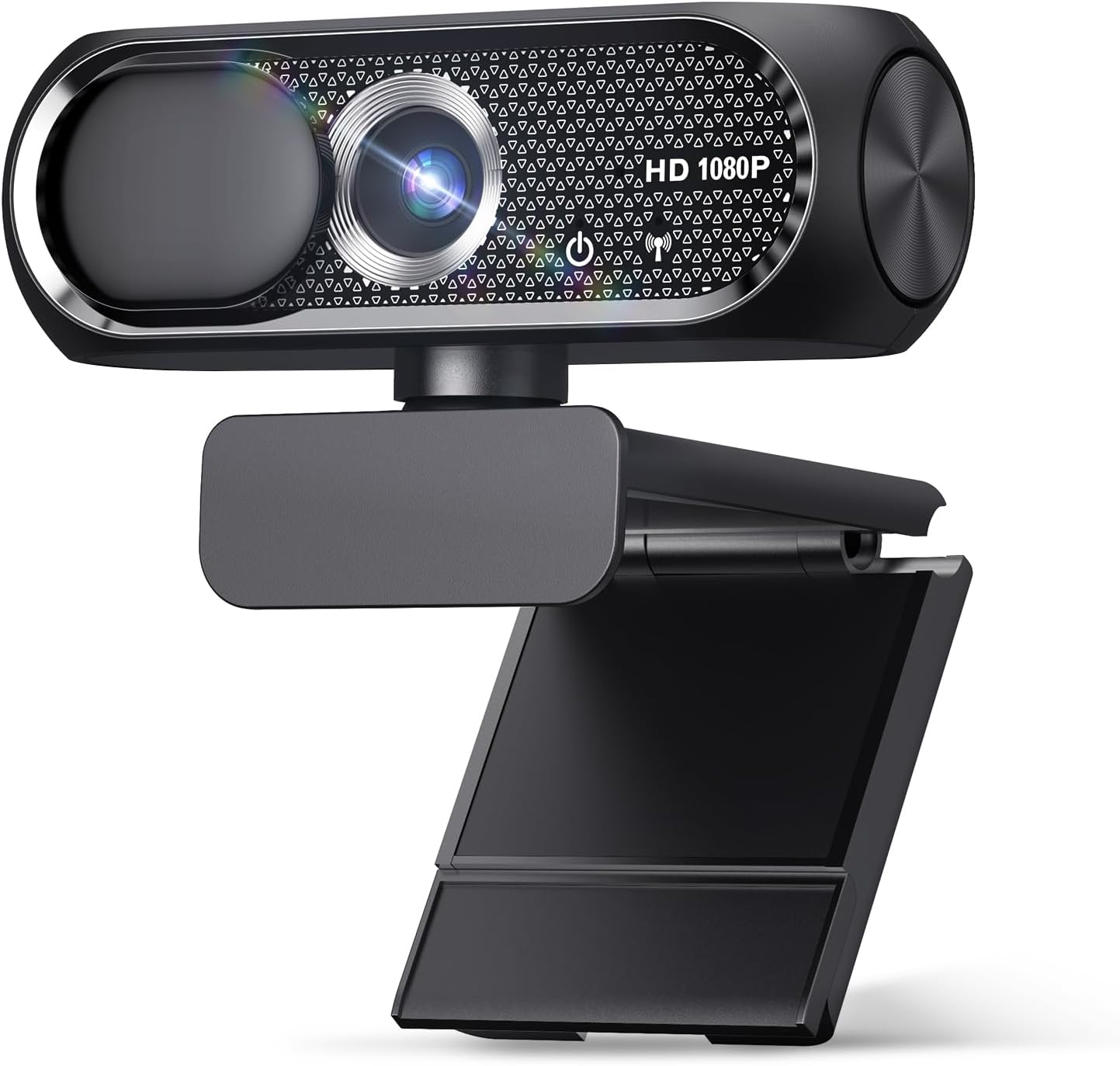
Price: $16.99 (down from $19.99) | Rating: 4.7/5 (75 ratings) | 1080p: Yes
Here's an interesting option: a no-name brand webcam that actually delivers 1080p resolution for less than the Logitech C270's 720p. At $16.99, this is the cheapest 1080p webcam on our list, and it comes with a privacy cover and wide-angle lens. The 4.7-star rating is impressive, though it's based on only 75 reviews, so take that with a grain of salt.
Key Features:
- 1080p Full HD resolution
- Built-in microphone
- Privacy cover included
- Wide-angle lens
- Plug-and-play USB connectivity
- Compatible with Zoom, Skype, laptop, desktop, PC, and Mac
Pros:
- 1080p at $17 is hard to beat on pure specs
- Privacy cover is a nice inclusion at this price
- Wide-angle lens gives you more framing flexibility
- Highest rating (4.7) on our list
Cons:
- Unknown brand with limited track record
- Only 75 ratings — not enough data to confirm long-term reliability
- Build quality is likely inferior to Logitech or EMEET
- No specific mention of auto-light correction
- Customer support may be limited if issues arise
Bottom Line: This is a gamble that might pay off. If you're on an absolute tight budget and want 1080p, it's worth considering — but the lack of brand reputation and limited reviews make it a riskier choice than the Logitech options. If reliability matters to you, spend the extra $1 for the C270 or the extra $11 for the EMEET C960.
3. EMEET C960 1080P Webcam — Best Value 1080p
Price: $28.49 (down from $39.99) | Rating: 4.4/5 (2,228 ratings) | 1080p: Yes
The EMEET C960 is the sweet spot on this list. At $28.49, it gives you true 1080p resolution, dual microphones, and a wide 90° field of view — features that compete with webcams twice its price. With strong ongoing sales and over 2,200 ratings, it's clearly striking a chord with buyers who want quality without the premium price tag.
Key Features:
- 1080p Full HD at 30fps
- Dual built-in microphones
- 90° wide field of view
- USB Type-A with A-to-C adapter included
- Fixed focus
- Plug-and-play for Zoom, Teams, FaceTime, YouTube, Google Meet
- Compatible with Nintendo Switch 2 as a camera
- ClimatePartner certified (2025 version)
Pros:
- Excellent price-to-performance ratio
- Dual mics provide better audio than single-mic competitors
- 90° FOV is great for small group calls or showing your setup
- USB-C adapter included — no extra dongle needed
- Strong sales volume confirms market trust
Cons:
- Fixed focus means no auto-framing or face tracking
- No privacy shutter
- EMEET brand is less recognized than Logitech
- Build quality is decent but not premium
Bottom Line: For most people looking for the best webcams 2026 in the mid-range category, the EMEET C960 is our top recommendation. It delivers 1080p quality, dual mics, and a wide FOV for under $30 — a combination that's hard to beat.
4. Logitech Brio 101 Full HD 1080p — Best for Auto-Light Correction
Price: $37.07 (down from $39.42) | Rating: 4.4/5 (7,316 ratings) | 1080p: Yes
The Logitech Brio 101 sits in an interesting spot. It's a 1080p webcam with Logitech's auto-light correction, a built-in mic, and a privacy shutter — all for $37.07. It's more expensive than the EMEET C960 but offers the peace of mind that comes with the Logitech brand name and a physical privacy cover. With over 7,300 ratings and 10,000+ monthly sales, it's a popular choice.
Key Features:
- 1080p Full HD at 30fps
- Auto-light correction
- Built-in microphone
- Privacy shutter included
- USB-A connectivity
- Compatible with Teams, Google Meet, Zoom, and more
- ECOLOGO certified
Pros:
- Logitech brand reliability and support
- Privacy shutter is a valuable inclusion
- Auto-light correction handles challenging lighting well
- Solid 7,300+ rating base
- Good middle-ground price for 1080p
Cons:
- More expensive than the EMEET C960 with fewer features (single mic, narrower FOV)
- No USB-C adapter included
- Auto-light correction is good but not dramatically better than competitors
- Single microphone vs. dual mics on the EMEET
Bottom Line: The Brio 101 is a solid choice if you value the Logitech brand and want a privacy shutter. However, at $37.07, it's harder to recommend over the EMEET C960, which offers dual mics and a wider FOV for $8.50 less. Choose this if brand trust and the privacy shutter are your top priorities.
5. Logitech C920x HD Pro — Best Overall for Serious Users

Price: $69.99 | Rating: 4.6/5 (21,920 ratings) | 1080
At a glance
| Use Case | Product | Why |
|---|---|---|
| Best Overall | Logitech Brio 101 Full HD 1080p Webcam for Streaming and Meetings - Black | 1080p with auto-light correction | Logitech Brio 101 Full HD 1080p Webcam for Streaming and Meetings - Black | 1080p with auto-light correction, built-in mic, privacy shutter, USB-A, compatible with Teams, Google Meet, Zoom and more ECOLOGO |
| Best Value | 1080P HD Webcam with Microphone | 1080P HD Webcam with Microphone, Privacy Cover, Wide-Angle Lens, Plug & Play USB Webcam for Laptop, Desktop, PC, Mac, Zoom, Skype (Deep Black) |
| Premium Pick | Logitech C270 720p Webcam Plug-and-Play Wide Screen Video Calling - Black | Auto-Light Correct | Logitech C270 720p Webcam Plug-and-Play Wide Screen Video Calling - Black | Auto-Light Correct, Noise-Reducing Mic, Zoom, Microsoft, Teams, Skype, Nintendo Switch 2 New GameChat Mode, PC Mac compatible ECOLOGO |
| Also Great | EMEET C960 1080P Webcam with Microphone | EMEET C960 1080P Webcam with Microphone, 2 Mics, 90° FOV, Computer Camera | USB Type-A & A-to-C Adapter, Fixed Focus, Plug&Play for Zoom/Teams/Facetime/YouTube/Google Meet/Switch 2 Camera, 2025 Version ClimatePartner certified |
| Also Great | Logitech C920x HD Pro PC Webcam Full 1080p/30fps Video - Black | 30fps Video | Logitech C920x HD Pro PC Webcam Full 1080p/30fps Video - Black | 30fps Video, Clear Audio, Light Correction, Works with Teams, Meet, Zoom, Nintendo Switch 2, Mac, Tablet ECOLOGO |
Performance Breakdown
Scores out of 10. Based on the Abvorn Verdict Engine.
Products Mentioned
Logitech Brio 101 Full HD 1080p Webcam for Streaming and Meetings - Black | 1080p with auto-light correction


Logitech C270 720p Webcam Plug-and-Play Wide Screen Video Calling - Black | Auto-Light Correct


Logitech C920x HD Pro PC Webcam Full 1080p/30fps Video - Black | 30fps Video

Frequently Asked Questions
What is the best webcams?
Logitech Brio 101 Full HD 1080p Webcam for Streaming and Meetings - Black | 1080p with auto-light correction is our current top pick for Webcams. It earned an Abvorn Verdict score of 7.0/10 for video quality, audio quality, features & software, and at $37.07 it offers the strongest balance of video quality, audio quality, features & software for the money.
Is Logitech Brio 101 Full HD 1080p Webcam for Streaming and Meetings - Black | 1080p with auto-light correction worth it?
Based on our research, yes for most people. Logitech Brio 101 Full HD 1080p Webcam for Streaming and Meetings - Black | 1080p with auto-light correction scored 7.0/10 on our rubric, which weighs video quality, audio quality, features & software in proportion to what real buyers care about. Logitech Brio 101 Full HD 1080p Webcam for Streaming and Meetings - Black | 1080p with auto-light correction excels in Value for Money but falls short on Features & Software. Our view: The best bang for your buck — ideal if you're watching your wallet.
How much should I spend on webcams?
You can get a genuinely good webcams for around $40. Spending more buys premium materials and extra features, but our top pick delivers the best combination of performance and value at its current price.
What should I look for when buying webcams?
We score every product on video quality, audio quality, features & software. Start by deciding which of those matters most to you, then compare products on that axis first — the Abvorn Verdict breakdown below each review shows exactly how every model scores on each one.
How does Abvorn test products?
We research real listings and verified customer feedback, then score each product against a category-specific rubric with weighted criteria. Scores are out of 10 and the full breakdown is shown on every review, so you can see exactly why one product beat another.