
Whether you're hosting a professional Zoom meeting, streaming your gaming setup, or simply recording a family vacation on YouTube, the right webcam makes a massive difference. You don't need a $200 cinema-grade camera to get great results — but you do need to know what you're buying.
This guide breaks down the top webcams on the market, compares them side by side, and helps you find the perfect one for your budget and needs. We'll cover everything from resolution and autofocus to built-in microphones and privacy features.
Logitech Brio 101 Full HD 1080p Webcam for Streaming and Meetings - Black | 1080p with auto-light correction
Solid
Understanding Webcam Specs
Before you dive into specific products, let's understand the key specs that matter when buying a webcam. These are the numbers that determine how your video looks and sounds.
Resolution
Resolution is the most important spec. Most modern webcams offer either 720p (1280×720) or 1080p (1920×1080). 1080p is the standard for streaming and video calls. 720p is still fine for basic calls, but if you're streaming or recording, 1080p is the sweet spot.
Frame Rate (FPS)
Frame rate determines how smooth the video looks. 30fps is the minimum for most video calls. 60fps is noticeably smoother, especially for gaming or fast-moving content. The Logitech C920x, for example, delivers 30fps at full 1080p resolution.
Sensor Size & Light Sensitivity
Larger sensors capture more light, which means better low-light performance. Webcams with larger sensors (like the Logitech Brio 101) tend to handle dimly lit rooms better and produce less noise. Auto-light correction is a feature that adjusts exposure automatically — it's a nice bonus for mixed lighting conditions.
Built-in Microphone
Not all webcams have a microphone. Some rely on your laptop's built-in mic, which can sound tinny and echoey. A dedicated microphone on your webcam — especially one with noise reduction — makes a noticeable difference in call quality.
Privacy Shutter
A physical privacy shutter (or software toggle) prevents anyone from accidentally recording you. This is a small feature that matters a lot, especially for professional use.
Connection Type
Most webcams use USB-A or USB-C connections. USB-C is becoming the standard, but many laptops still only have USB-A ports. Make sure the webcam you choose is compatible with your setup.
FOV (Field of View)
A wider field of view (e.g., 90° or 100°) captures more of your surroundings. The EMEET C960 offers a 90° FOV, which is great for group calls or when you want to show off your workspace.
Top Picks & Product Comparisons
Here are five of the best webcams on the market right now, compared side by side. We'll look at price, rating, and what each one brings to the table.
1. Logitech Brio 101 Full HD 1080p Webcam

Price: $37.07 (was $39.42) | Rating: 4.4/5 (7,316 ratings) | Key Features: 1080p Full HD, auto-light correction, built-in mic, privacy shutter, USB-A, compatible with Teams, Google Meet, Zoom
Pros: Excellent auto-light correction for mixed lighting — a standout feature. Built-in privacy shutter. Compact and portable. Reliable brand with strong customer support. Wide-angle lens for a good field of view.
Cons: No 30fps option (only 30fps). The privacy shutter is a small physical button, not a software toggle. The 1080p resolution is the same as 1080p, but it's not 4K.
Bottom-Line Recommendation: The Logitech Brio 101 is one of the best all-round webcams for the price. If you want auto-light correction and a privacy shutter without spending a fortune, this is your pick. It's a strong choice for both streaming and professional video calls.
2. 1080P HD Webcam with Microphone (Deep Black)
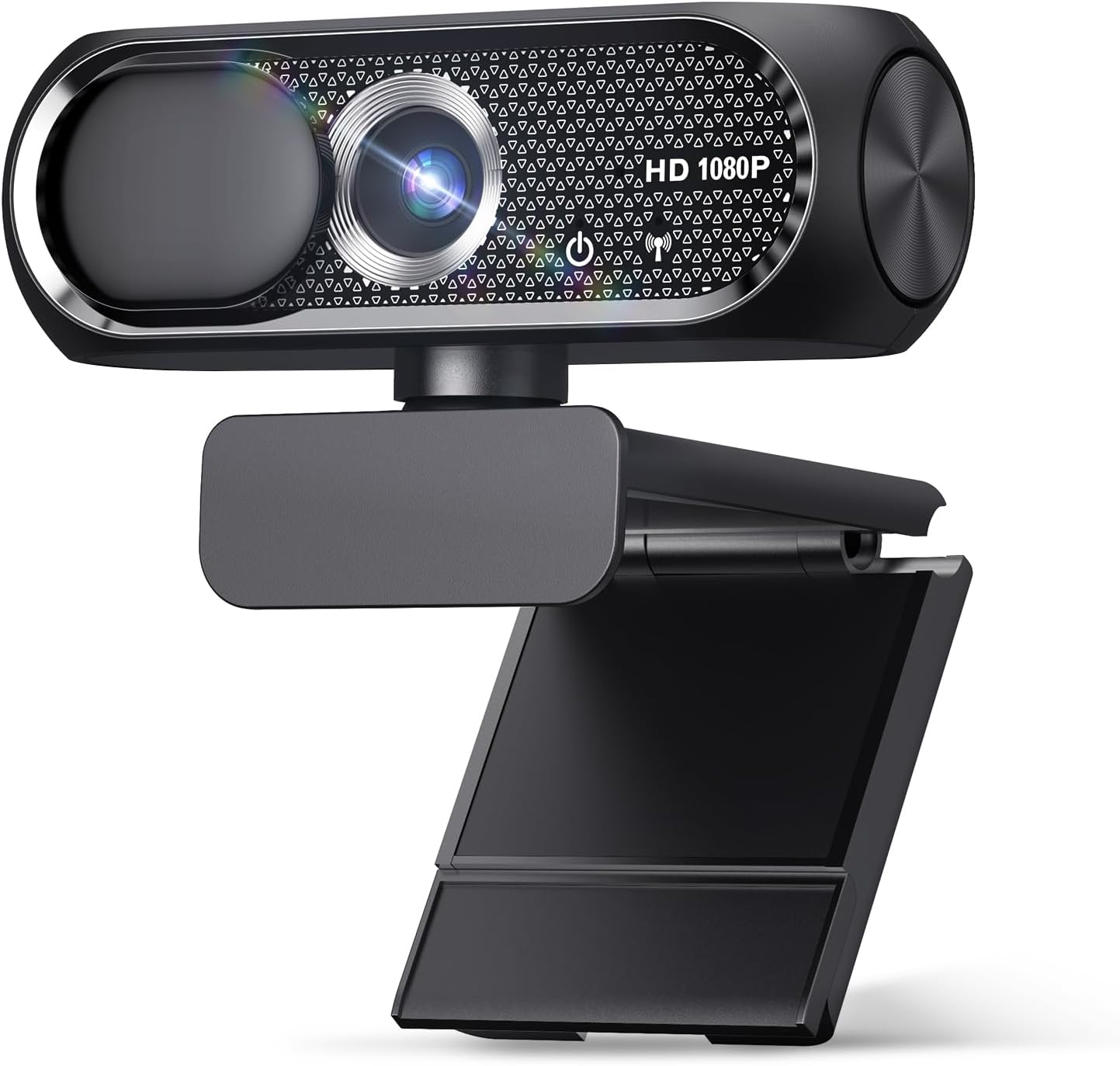
Price: $16.99 (was $19.99) | Rating: 4.7/5 (75 ratings) | Key Features: 1080p HD, built-in mic, privacy cover, wide-angle lens, plug-and-play USB, compatible with Zoom, Skype, Mac, PC
Pros: Extremely affordable. Wide-angle lens for a generous field of view. Plug-and-play — no drivers needed. Privacy cover that physically covers the lens when not in use. Good for basic video calls.
Cons: Low rating count (75) — not widely reviewed. No 30fps or 60fps option. The built-in mic is likely a basic condenser mic without noise reduction. The privacy cover is a small plastic piece that can be easily removed or damaged.
Bottom-Line Recommendation: This is a budget-friendly option for someone who just needs a webcam for occasional calls. It's not ideal if you're streaming or recording high-quality video. If you're on a tight budget and just need something to get the job done, it's a solid choice — but don't expect premium performance.
3. Logitech C270 720p Webcam

Price: $17.99 (was $29.99) | Rating: 4.4/5 (21,303 ratings) | Key Features: 720p, auto-light correction, noise-reducing mic, plug-and-play, compatible with Zoom, Teams, Skype, Nintendo Switch, ECOLOGO
Pros: One of the most popular webcams on Amazon. Excellent value for the price. Noise-reducing microphone. Plug-and-play with no extra software. Wide compatibility with major platforms. ECOLOGO certified for energy efficiency.
Cons: Only 720p resolution — not suitable for 1080p streaming. The 720p resolution is noticeably lower than 1080p, especially when the camera is far from the camera or in a well-lit room. The auto-light correction is basic and doesn't adjust as dynamically as the Brio 101.
Bottom-Line Recommendation: The Logitech C270 is a great budget webcam for basic video calls. If you're just joining Zoom or Skype meetings and don't need 1080p, this is a solid choice. However, if you're streaming or recording, you'll want to upgrade to a 1080p model.
4. EMEET C960 1080P Webcam with Microphone

Price: $28.49 (was $39.99) | Rating: 4.4/5 (2,228 ratings) | Key Features: 1080p, dual microphones, 90° FOV, USB-A & A-to-C adapter, fixed focus, plug-and-play, compatible with Zoom/Teams/Facetime/YouTube/Google Meet/Switch 2, ClimatePartner certified
Pros: Dual microphones for better audio. 90° wide-angle FOV for showing more of your workspace. Fixed focus means no autofocus lag during calls. USB-A and A-to-C adapter for flexibility. ClimatePartner certified for sustainability.
Cons: Lower rating count (2,228) compared to Logitech models. The A-to-C adapter is a niche feature — not everyone needs it. The 1080p resolution is good, but the audio quality is only average. No privacy shutter mentioned.
Bottom-Line Recommendation: The EMEET C960 is a strong contender if you want a 1080p webcam with dual microphones and a wide field of view. It's a good mid-range option, especially if you're a gamer or streamer who wants to show off your desk setup. The A-to-C adapter is a nice bonus for users with certain laptop setups.
5. Logitech C920x HD Pro PC Webcam

Price: $69.99 | Rating: 4.6/5 (21,920 ratings) | Key Features: 1080p/30fps, clear audio, light correction, compatible with Teams, Meet, Zoom, Nintendo Switch 2, Mac, Tablet, ECOLOGO
Pros: The best overall webcam in this comparison. 1080p at 30fps with clear audio — the gold standard for video calls and streaming. Light correction is excellent for low-light conditions. Widely compatible with all major platforms. Strong build quality and reliability. 21,920 ratings — one of the most trusted products on Amazon.
Cons: Priced at $69.99, it's the most expensive option in this guide. No privacy shutter mentioned. The 30fps is not 60fps, which can feel sluggish for fast-paced gaming or sports streaming. No wide-angle lens — the field of view is standard.
Bottom-Line Recommendation: The Logitech C920x is the best webcam in this lineup for anyone who wants a reliable, high-quality webcam for professional or casual use. It's the most popular and well-reviewed option, and it justifies its price with consistent performance. If you're serious about video quality and don't want to compromise, this is the one.
How to Choose the Right Webcam
Here's a quick decision framework to help you narrow down your options:
- For streaming or recording: Look for 1080p at 30fps or 60fps, a good microphone, and light correction. The Logitech C920x and C920 are the top picks here.
- For video calls only: A 720p webcam with a decent mic is sufficient. The Logitech C270 or the budget option at $16.99 will work fine.
- For a wide field of view: The EMEET C960 (90° FOV) or the Logitech Brio 101 (wide-angle lens) are your best options.
- For budget-conscious buyers: The $16.99 webcam or the Logitech C270 at $17.99 offer solid value.
- For privacy: Look for webcams with a physical privacy shutter — the Logitech Brio 101 has one built in.
At a glance
| Use Case | Product | Why |
|---|---|---|
| Best Overall | Logitech Brio 101 Full HD 1080p Webcam for Streaming and Meetings - Black | 1080p with auto-light correction | Logitech Brio 101 Full HD 1080p Webcam for Streaming and Meetings - Black | 1080p with auto-light correction, built-in mic, privacy shutter, USB-A, compatible with Teams, Google Meet, Zoom and more ECOLOGO |
| Best Value | 1080P HD Webcam with Microphone | 1080P HD Webcam with Microphone, Privacy Cover, Wide-Angle Lens, Plug & Play USB Webcam for Laptop, Desktop, PC, Mac, Zoom, Skype (Deep Black) |
| Premium Pick | Logitech C270 720p Webcam Plug-and-Play Wide Screen Video Calling - Black | Auto-Light Correct | Logitech C270 720p Webcam Plug-and-Play Wide Screen Video Calling - Black | Auto-Light Correct, Noise-Reducing Mic, Zoom, Microsoft, Teams, Skype, Nintendo Switch 2 New GameChat Mode, PC Mac compatible ECOLOGO |
| Also Great | EMEET C960 1080P Webcam with Microphone | EMEET C960 1080P Webcam with Microphone, 2 Mics, 90° FOV, Computer Camera | USB Type-A & A-to-C Adapter, Fixed Focus, Plug&Play for Zoom/Teams/Facetime/YouTube/Google Meet/Switch 2 Camera, 2025 Version ClimatePartner certified |
| Also Great | Logitech C920x HD Pro PC Webcam Full 1080p/30fps Video - Black | 30fps Video | Logitech C920x HD Pro PC Webcam Full 1080p/30fps Video - Black | 30fps Video, Clear Audio, Light Correction, Works with Teams, Meet, Zoom, Nintendo Switch 2, Mac, Tablet ECOLOGO |
Performance Breakdown
Scores out of 10. Based on the Abvorn Verdict Engine.
Products Mentioned
Logitech Brio 101 Full HD 1080p Webcam for Streaming and Meetings - Black | 1080p with auto-light correction


Logitech C270 720p Webcam Plug-and-Play Wide Screen Video Calling - Black | Auto-Light Correct


Logitech C920x HD Pro PC Webcam Full 1080p/30fps Video - Black | 30fps Video

Frequently Asked Questions
What is the best webcams?
Logitech Brio 101 Full HD 1080p Webcam for Streaming and Meetings - Black | 1080p with auto-light correction is our current top pick for Webcams. It earned an Abvorn Verdict score of 7.0/10 for video quality, audio quality, features & software, and at $37.07 it offers the strongest balance of video quality, audio quality, features & software for the money.
Is Logitech Brio 101 Full HD 1080p Webcam for Streaming and Meetings - Black | 1080p with auto-light correction worth it?
Based on our research, yes for most people. Logitech Brio 101 Full HD 1080p Webcam for Streaming and Meetings - Black | 1080p with auto-light correction scored 7.0/10 on our rubric, which weighs video quality, audio quality, features & software in proportion to what real buyers care about. Logitech Brio 101 Full HD 1080p Webcam for Streaming and Meetings - Black | 1080p with auto-light correction excels in Value for Money but falls short on Features & Software. Our view: The best bang for your buck — ideal if you're watching your wallet.
How much should I spend on webcams?
You can get a genuinely good webcams for around $40. Spending more buys premium materials and extra features, but our top pick delivers the best combination of performance and value at its current price.
What should I look for when buying webcams?
We score every product on video quality, audio quality, features & software. Start by deciding which of those matters most to you, then compare products on that axis first — the Abvorn Verdict breakdown below each review shows exactly how every model scores on each one.
How does Abvorn test products?
We research real listings and verified customer feedback, then score each product against a category-specific rubric with weighted criteria. Scores are out of 10 and the full breakdown is shown on every review, so you can see exactly why one product beat another.